
RECENT POSTS
May2026
How to Set Up an Office Canteen?
April 2026
The Main Difference Between Inkjet and Laser Printers
March 2026
How to Choose the Right Paper Shredder for Your Small Office?
Feb 2026
What Are the Popular Sustainable Office Supplies in Ireland?
March 2025
Celebrate International Cleaning Week: A fresh start for your office
February 2024
The Ultimate Guide to Lever Arch Files
January 2024
The Importance of First Aid in the Office
September 2023
Elevate your Office with our Great Selection of Desks
August 2022
Things to do Before you go Out of Office
July 2022
Staying Cool in the Office this Summer
June 2022
Office Games and Team Building
March 2022
January 2022
November 2021
5 Tips For Improving Employee Wellbeing
September 2021
There Is Nothing Like a Physical Diary
August 2021
Office Walls That Work For You
Back to the office or staying at home?
July 2021
How To Cope With Heat In The Office
June 2021
Clean Air Helps Prevent Office Illness
May 2021
April 2021
The Slow and Steady Return to the Office
March 2021
How to become a more green office
December 2020
Things to do before you close for Christmas 2020
November 2020
Why an Office Chair is the perfect Christmas gift
Benefits of using a Height Adjustable Desk
October 2020
How to Work from Home Successfully
How Important is Face to Face Communication in Business?
September 2020
Are you using your office walls properly?
August 2020
Guide to Choosing the Right Office Shredder
Low Cost Office Back to School Guide
July 2020
What office comforts do you miss the most?
June 2020
Father's Day Office Gift Ideas
Three Facts Every Coffee Drinker Should Know
May 2020
The Importance of Having the Right Office Supplies for Homeworking
April 2020
The Three Best Free Video Conferencing Apps
Time to do some spring cleaning
Donating to Charity During Covid-19
March 2020
Office Prevention for COVID-19
February 2020
Why You Should Be Allowed Bring Your Pet To Work
January 2020
5 Ice Breakers You Could Use In Your Next Meeting
Beat the January Blues this year
December 2019
Things to do before you close for Christmas
Why you should decorate your office this Christmas
November 2019
Dealing With Monday Morning Blues
Stress Management In The Workplace
October 2019
The Key to Effective Presentations
5 receptionist skills that can affect the entire company
September 2019
Get Some Exercise In to Your Work Day
How to Win at Being a Working Parent
Basic Starter Guide to Packaging
Swap Ideas Day Workspace Setup
August 2019
Three Leadership Styles and One to Avoid
The importance of taking a break
5 Quick tips for a safer workplace
July 2019
The Etiquette of the Office Fridge

Choosing between an inkjet and a laser printer is one of the most common decisions businesses and home office users face and it's easy to pick the wrong one if you don't understand how they differ. Both can print, scan, copy and connect wirelessly, but the technology inside each machine means they perform very differently on cost, speed, quality and upkeep. Pick the wrong one and you end up either overspending on cartridges every month or waiting around for a printer that can't keep up with your workload.
Here's everything you need to know about the differences between inkjet and laser printers so you can pick the right one for your workload and we've included Brother printers available at Low-Cost Office to show how it plays out in practice. Whether you're setting up a home office, kitting out a small business, or replacing an ageing printer that's costing too much to run, the right choice makes a bigger difference than most people realise.
How Do Inkjet and Laser Printers Actually Work?
The fundamental difference is in how each machine puts an image onto paper. Inkjet printers spray tiny droplets of liquid ink through microscopic nozzles onto the page. The ink is stored in cartridges, and the printer builds images dot by dot which is why inkjets handle photos and colour gradients exceptionally well.
Laser printers use a laser beam (or LED array) to draw an electrostatic image on a rotating drum. That drum then attracts fine toner powder, which gets fused onto the paper with heat. The result is fast, sharp text that doesn't smudge and pages that feel dry the moment they come out.
Different technologies, different strengths. Here's how that translates into real-world performance.
| Feature | Inkjet Printers | Laser Printer |
| Best Use | Photos, colour, low volume | High-Volume text, professional docs |
| Upfront Cost | Low | High |
| Cost per Page | Higher | Lower |
| Print Speed | Slower (10-33ppm) | Fast (20–100 ppm) |
| Consumables | Ink Cartridges(liquid) | Toner cartridges (powder) |
| Print Quality | Excellent for photos & Colour | Excellent for text and sharpness |
| Size | Small & compact | Often larger and heavier |
| Noise Level | Quieter | Louder |
| Cartridge Life Span | Dries out if unused | Long shelf life, doesn't dry out |
| Page Yield | 200–500 pages | 1,500–10,000+ pages |
| Ideal User |
Home / creative users | Office / business users |
Which Printer Is Better for Office Use?
For most offices, a laser printer is the smarter long-term choice. Offices typically print high volumes of text-based documents reports, invoices, contracts, emails and that's exactly where laser printers shine. They're faster, cheaper per page, more reliable for back-to-back printing, and produce sharper text that won't smudge if a page gets splashed or handled.
Laser printers are also more forgiving for offices with irregular print patterns. If your team prints heavily one week and barely at all the next, an inkjet's ink cartridges can dry out and clog between uses. Toner doesn't have that problem, which means fewer wasted cleaning cycles and fewer unexpected replacements.
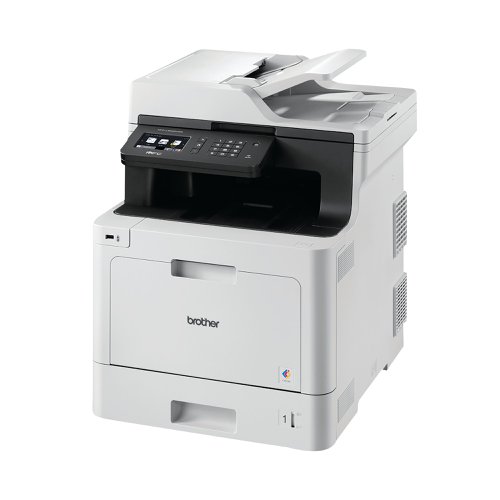
That said, inkjets still have a place in office environments particularly for small creative teams, marketing departments printing colour mock-ups, or home offices where print volume is lower and photo quality matters. For a small office printing under 500 pages a month, the Brother MFC-J4340DWE Colour Inkjet MFP is an affordable pick. For busier offices with higher print demands, the Brother MFC-L860DWE Mono Laser MFP is the better investment the upfront cost is higher, but the cost per page and speed will pay off within months.
How Do I Choose the Right Printer?
There's no universal "best" printer only the right one for how you work. Here are five practical tips to help you decide:
- Estimate your monthly print volume - If you print under 500 pages a month, an inkjet usually makes financial sense. Over 500 pages and a laser printer will save you money on cost per page within the first year.
- Think about what you print - Mostly text and documents? Go laser. Mostly photos, marketing materials or colour-heavy content? Go inkjet.
- Factor in your office space - Lasers are larger and heavier. If you're tight on desk space or setting up a small home office, an inkjet's compact footprint can be a real advantage.
- Consider how often you'll use it - If your printer will sit idle for weeks at a time, go laser inkjet cartridges dry out and waste ink on cleaning cycles.
- Look beyond the sticker price - Cheap inkjets often have expensive ink. A laser with a higher upfront price can be significantly cheaper over three years. Calculate cost per page, not just the cost of the machine.
If you're still unsure, the Low-Cost Office team can recommend the right printer based on your print volume, budget and use case nationwide delivery across Ireland.
FAQs
1.Which is cheaper to run, an inkjet or a laser printer?
Laser printers are cheaper to run for most offices because toner yields far more pages per cartridge than ink, giving a lower cost per page.
2.Do laser printers print good photos?
Colour lasers produce vivid graphics for charts and flyers, but inkjets still win on true photographic detail and smooth gradients.
3. Can a laser printer be used at home?
Yes, lasers work well at home for anyone printing more than 500 pages a month, with lower running costs and no risk of ink drying out.
4. Are inkjet printers slower than laser printers?
Yes, inkjets typically print at 10–33 pages per minute, while lasers hit 20–100 ppm and stay fast across long print runs.
Choosing between an inkjet and a laser printer is one of the most common decisions businesses and home office users face and it's easy to pick the wrong one if you don't understand how they differ. Both can print, scan, copy and connect wirelessly, but the technology inside each machine means they perform very differently on cost, speed, quality and upkeep. Pick the wrong one and you end up either overspending on cartridges every month or waiting around for a printer that can't keep up with your workload.
Here's everything you need to know about the differences between inkjet and laser printers so you can pick the right one for your workload and we've included Brother printers available at Low-Cost Office to show how it plays out in practice. Whether you're setting up a home office, kitting out a small business, or replacing an ageing printer that's costing too much to run, the right choice makes a bigger difference than most people realise.
How Do Inkjet and Laser Printers Actually Work?
The fundamental difference is in how each machine puts an image onto paper. Inkjet printers spray tiny droplets of liquid ink through microscopic nozzles onto the page. The ink is stored in cartridges, and the printer builds images dot by dot which is why inkjets handle photos and colour gradients exceptionally well.
Laser printers use a laser beam (or LED array) to draw an electrostatic image on a rotating drum. That drum then attracts fine toner powder, which gets fused onto the paper with heat. The result is fast, sharp text that doesn't smudge and pages that feel dry the moment they come out.
Different technologies, different strengths. Here's how that translates into real-world performance.
| Feature | Inkjet Printers | Laser Printer |
| Best Use | Photos, colour, low volume | High-Volume text, professional docs |
| Upfront Cost | Low | High |
| Cost per Page | Higher | Lower |
| Print Speed | Slower (10-33ppm) | Fast (20–100 ppm) |
| Consumables | Ink Cartridges(liquid) | Toner cartridges (powder) |
| Print Quality | Excellent for photos & Colour | Excellent for text and sharpness |
| Size | Small & compact | Often larger and heavier |
| Noise Level | Quieter | Louder |
| Cartridge Life Span | Dries out if unused | Long shelf life, doesn't dry out |
| Page Yield | 200–500 pages | 1,500–10,000+ pages |
| Ideal User |
Home / creative users | Office / business users |
Which Printer Is Better for Office Use?
For most offices, a laser printer is the smarter long-term choice. Offices typically print high volumes of text-based documents reports, invoices, contracts, emails and that's exactly where laser printers shine. They're faster, cheaper per page, more reliable for back-to-back printing, and produce sharper text that won't smudge if a page gets splashed or handled.
Laser printers are also more forgiving for offices with irregular print patterns. If your team prints heavily one week and barely at all the next, an inkjet's ink cartridges can dry out and clog between uses. Toner doesn't have that problem, which means fewer wasted cleaning cycles and fewer unexpected replacements.
That said, inkjets still have a place in office environments particularly for small creative teams, marketing departments printing colour mock-ups, or home offices where print volume is lower and photo quality matters. For a small office printing under 500 pages a month, the Brother MFC-J4340DWE Colour Inkjet MFP is an affordable pick. For busier offices with higher print demands, the Brother MFC-L860DWE Mono Laser MFP is the better investment the upfront cost is higher, but the cost per page and speed will pay off within months.
How Do I Choose the Right Printer?
There's no universal "best" printer only the right one for how you work. Here are five practical tips to help you decide:
- Estimate your monthly print volume - If you print under 500 pages a month, an inkjet usually makes financial sense. Over 500 pages and a laser printer will save you money on cost per page within the first year.
- Think about what you print - Mostly text and documents? Go laser. Mostly photos, marketing materials or colour-heavy content? Go inkjet.
- Factor in your office space - Lasers are larger and heavier. If you're tight on desk space or setting up a small home office, an inkjet's compact footprint can be a real advantage.
- Consider how often you'll use it - If your printer will sit idle for weeks at a time, go laser inkjet cartridges dry out and waste ink on cleaning cycles.
- Look beyond the sticker price - Cheap inkjets often have expensive ink. A laser with a higher upfront price can be significantly cheaper over three years. Calculate cost per page, not just the cost of the machine.
If you're still unsure, the Low-Cost Office team can recommend the right printer based on your print volume, budget and use case nationwide delivery across Ireland.
FAQs
1.Which is cheaper to run, an inkjet or a laser printer?
Laser printers are cheaper to run for most offices because toner yields far more pages per cartridge than ink, giving a lower cost per page.
2.Do laser printers print good photos?
Colour lasers produce vivid graphics for charts and flyers, but inkjets still win on true photographic detail and smooth gradients.
3. Can a laser printer be used at home?
Yes, lasers work well at home for anyone printing more than 500 pages a month, with lower running costs and no risk of ink drying out.
4. Are inkjet printers slower than laser printers?
Yes, inkjets typically print at 10–33 pages per minute, while lasers hit 20–100 ppm and stay fast across long print runs.
